Have you ever wanted to add a furry friend to your Sims 4 household but weren’t sure how to adopt a stray dog? You’re in the right place.
Getting a stray dog in the game isn’t just fun—it brings new life and excitement to your Sims’ world. Imagine the joy your Sims will feel when they find and welcome a loyal companion. In this guide, you’ll discover simple, step-by-step tips to make adopting a stray dog easy and rewarding.
Ready to give your Sims a new best friend? Keep reading to find out how!
Credit: gamerant.com
Finding Stray Dogs In Sims 4
Finding stray dogs in Sims 4 can be an exciting part of adding new furry friends to your household. It requires a little patience and knowing where to look. Understanding how to identify these strays ensures you don’t miss out on adopting a loyal companion.
Locations To Spot Strays
Stray dogs don’t just appear anywhere. They tend to hang around specific spots in the neighborhood. You can find them near parks, alleys, or community lots where Sims often gather.
Try visiting places like:
- Brindleton Bay’s docks and beaches
- Local parks with benches or playgrounds
- Near residential backstreets or abandoned lots
Spending time in these areas increases your chances of encountering a stray. Sometimes, they even wander close to your Sim’s home. Have you noticed a dog lingering near your lot after a walk? That might just be your future pet.
Signs A Dog Is Stray
Not every dog you see outside is a stray. You need to recognize the signs that show a dog is without an owner. Stray dogs usually look unkempt or hungry. They might avoid Sims at first, showing cautious behavior.
Look for these clues:
- Dirty or matted fur
- Skittish or shy movements
- Wandering without a collar or tags
- Approaching Sims hesitantly or staying on the outskirts
Once you spot a dog acting this way, try interacting with it gently. Your Sim’s kindness can build trust quickly. Have you ever felt a connection with a stray before it became your pet? That moment is truly special in the game.
Preparing Your Sim For Adoption
Before bringing a stray dog into your Sim’s life, it’s essential to get everything ready. Preparing your Sim for adoption means more than just wanting a pet; it involves creating the right environment and developing the necessary skills. This preparation sets your Sim and their new furry friend up for a happy, healthy relationship.
Creating A Pet-friendly Home
Your Sim’s house should feel welcoming and safe for a new dog. Start by adding a cozy bed or crate where the dog can rest. Place food and water bowls in an accessible spot, away from heavy foot traffic.
Think about your Sim’s lifestyle. Does your Sim have a large backyard or nearby parks for daily walks? If space is limited, consider adding interactive toys and scratching posts inside the home to keep the dog entertained.
- Clear away fragile items that curious paws might knock over.
- Install gates or barriers to restrict access to unsafe areas.
- Make sure your Sim’s home has enough room for play and relaxation.
Skills Needed For Pet Care
Before adopting, your Sim should develop certain skills to care properly for their new companion. The Pet Careskill is crucial; it covers feeding, grooming, and training dogs.
Building this skill helps your Sim understand dog behavior and needs better, reducing stress for both. You can improve it by reading pet care books, watching tutorial videos, or practicing with other animals.
Also, consider your Sim’s Empathyand Patiencetraits. Dogs may need extra attention, especially if they come from a tough background as strays often do. How will your Sim handle the challenges of a shy or anxious dog?
Approaching The Stray Dog
Approaching a stray dog in The Sims 4 requires patience and careful interaction. You want your Sim to create a bond before attempting to adopt. Rushing in too quickly can scare the dog away, so it’s important to take small, thoughtful steps.
Building Trust With The Dog
Start by simply letting your Sim stand near the stray without making sudden moves. Give the dog time to get used to your Sim’s presence. You might notice the dog wagging its tail or moving closer as a sign of comfort.
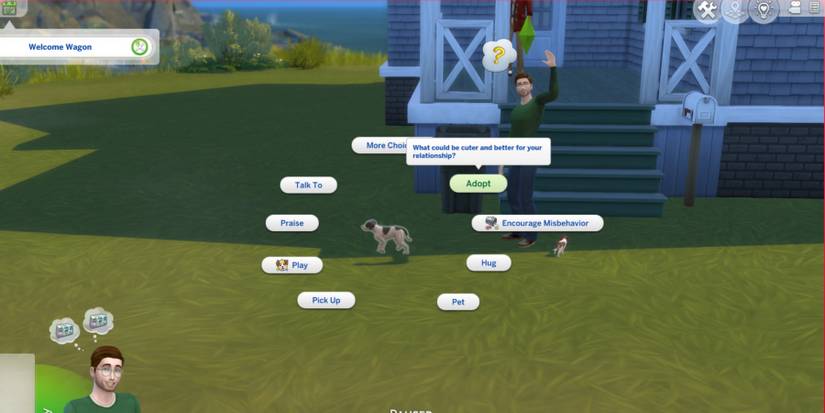
Try using calm, friendly interactions first, like “Talk to Dog” or “Pet Dog.” These actions help your Sim build a positive connection. Remember, trust doesn’t happen instantly; patience is key.
Using Interactions To Gain Affection
Once your Sim has gained some trust, use affectionate interactions to deepen the bond. Options like “Play with Dog,” “Give Treat,” or “Teach Trick” are great choices. Each positive interaction raises the dog’s affection toward your Sim.
Keep an eye on the dog’s mood and reactions. If the dog seems happy or excited, continue with those interactions. If it looks nervous, slow down and give it space before trying again.
Have you noticed which interactions work best for your Sim? Experimenting can reveal the dog’s unique personality and preferences, making the adoption process smoother and more rewarding.
Adoption Process In Sims 4
Adopting a stray dog in Sims 4 adds a new companion to your Sim’s household. The process involves a few clear steps that make the experience fun and rewarding. Sims can build bonds with stray dogs and bring them home to care for them. Understanding the adoption process helps players enjoy this feature fully.
Inviting The Dog Home
First, find a stray dog in the neighborhood. Approach the dog and choose the interaction to invite it home. The dog will follow your Sim back to their house. Your Sim should interact gently to make the dog comfortable. This step is essential to start the adoption journey.
Completing The Adoption
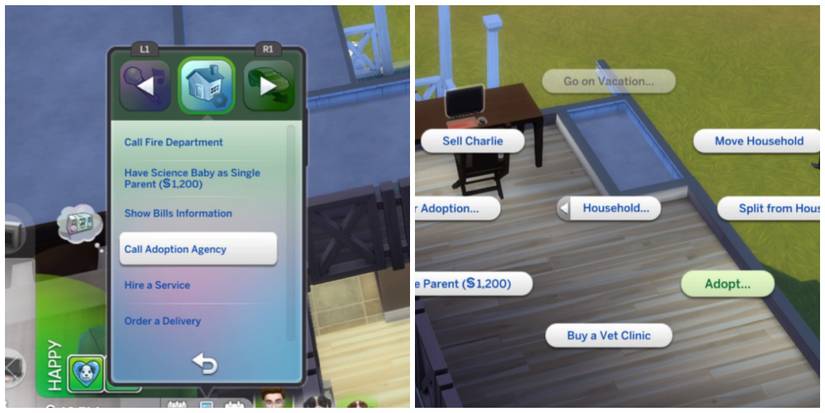
Once the dog is at home, your Sim needs to complete the adoption process. Use the computer or phone to send the adoption request. Wait for approval, which usually takes a short time. After approval, the dog officially becomes part of the household. Your Sim can now care for and play with the new pet.
Caring For Your New Pet
Caring for your new pet in The Sims 4 requires attention and love. Pets need daily care to stay happy and healthy. Building a strong bond makes your pet part of the family. Focus on feeding, grooming, training, and playing to keep your pet content. These actions affect your pet’s mood and behavior in the game. Learn how to care well for your furry friend and enjoy the experience together.
Feeding And Grooming
Feeding your pet regularly keeps it healthy and energetic. Provide fresh food and water every day. Use the pet bowl for easy feeding. Grooming is just as important. Brush your dog to keep its fur clean and shiny. Regular baths remove dirt and bad smells. Check your pet for ticks or fleas. Grooming also improves your pet’s mood and cleanliness. Keep your pet’s living area tidy for better health.
Training And Playing
Training helps your pet learn good behaviors and tricks. Teach basic commands like sit, stay, and come. Training sessions increase your pet’s skills and obedience. Playing with your pet strengthens your bond. Use toys to keep your dog active and happy. Take your dog outside for walks or games. Playtime reduces boredom and prevents bad habits. Consistent training and play make your pet well-behaved and joyful.
Credit: gamerant.com
Troubleshooting Common Issues
Adopting a stray dog in The Sims 4 can be a rewarding experience, but it doesn’t always go smoothly. You might face challenges like shy or aggressive dogs, or even encounter bugs that prevent adoption. Understanding how to troubleshoot these common issues can save you time and frustration, helping you build a happy home for your new furry friend.
Dealing With Shy Or Aggressive Dogs
Some stray dogs may seem distant or even hostile when you first meet them in the game. Don’t give up—patience is key. Spend time interacting gently by using friendly interactions like “Pet” or “Play,” which can slowly build trust.
If a dog is aggressive, avoid pushing too hard. Instead, let your Sim step back and try again later. Sometimes, introducing treats or toys can help soften their attitude. Have you noticed certain dog breeds in your game acting more aggressive? Tailoring your approach based on the dog’s behavior can make a big difference.
Fixing Adoption Glitches
Occasionally, you might find that the adoption option doesn’t appear or the process gets stuck. This can happen due to game bugs or conflicting mods. A quick reset of your Sim or the dog often fixes the problem—use the cheat “resetSim [Sim’s or dog’s full name]” in the command console.
If the glitch persists, try saving your game, exiting to the main menu, and reloading. Clearing the game cache can also help. Have you tried removing recently added mods or custom content? Sometimes, they cause conflicts that block the adoption feature.
Keep a backup of your save files before making big changes. This habit ensures you don’t lose progress while troubleshooting. By staying calm and methodical, you’ll overcome these glitches and welcome your stray dog into your Sims’ family.
Credit: gamerant.com
Frequently Asked Questions
How Do You Find Stray Dogs In Sims 4?
To find stray dogs in Sims 4, visit parks or neighborhoods. Stray dogs often roam around these areas. Use your Sim’s friendly interactions to befriend them. Look for the “Adopt” option once the relationship is strong enough.
Can You Adopt Stray Dogs In Sims 4?
Yes, you can adopt stray dogs in Sims 4. Build a relationship with the stray dog first. Use friendly interactions until the “Adopt” option appears. Once adopted, the dog becomes part of your household.
What Skills Help In Adopting Stray Dogs?
Building charisma and pet training skills can help in adopting stray dogs. Charisma improves interactions, while pet training helps manage behaviors. Both skills enhance your Sim’s ability to form bonds with strays.
Are There Specific Traits To Adopt Stray Dogs?
Traits like “Dog Lover” or “Animal Enthusiast” help in adopting stray dogs. These traits make it easier to build relationships with animals. Your Sim will have more success befriending and adopting stray dogs.
Conclusion
Adopting a stray dog in The Sims 4 adds fun and care to your game. You help a pet find a new home and friendship. The process is easy and brings joy to your Sim’s life. Try these simple steps to welcome a furry friend today.
Playing with pets makes the game more lively and warm. Enjoy the moments with your new dog and explore new adventures. This small act brings big happiness to your Sims. Give your virtual pet love and watch your story grow.

Emily Barker is the founder of ChillDogLife.com, a space dedicated to helping pup parents discover the best dog products, lifestyle tips, and cozy ideas for happier homes.
A lifelong dog lover, Emily combines her passion for pets with a knack for research to share trusted recommendations on everything from toys and furniture to health and everyday care.
Her goal is simple: to make life easier, stylish, and more joyful for dogs and the people who love them.